Excel formula to compare two columns
There is more than one formula for comparing columns, and on clean data they agree. They part ways on awkward values: text codes with leading zeros, very long descriptions, names containing an asterisk. Here all three are run on the same example, with a short guide to picking one.
Worked example on made-up data
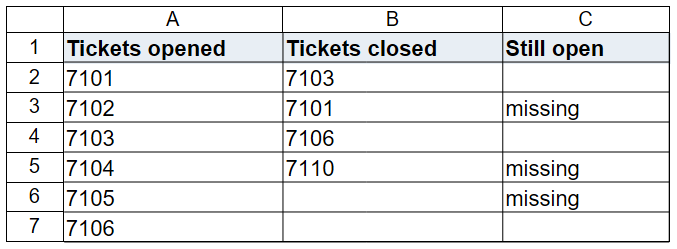
A small example: two lists, the formula our tool produced for them and the result of computing it. The data is invented for the example.
Formula for Excel
=IF(A2="","",IF(ISNA(MATCH(A2,$B$2:$B$5,0)),"missing",""))The formula was verified by computing it on this example (6 rows in the first list, 4 in the second): the result equals the reference answer. The example was also recomputed in LibreOffice Calc with the same result.
MATCH looks for the value of A2 in $B$2:$B$5; if it is not there MATCH returns #N/A, and ISNA turns that into 'not found'. Rows whose value is missing from the second list get "missing". Blank rows of the first list are not flagged. Paste the formula into C2 and fill it down to the end of $A$2:$A$7.
Other verified variants
- SUMPRODUCT
=IF(A2="","",IF(SUMPRODUCT(($B$2:$B$5=A2)*($B$2:$B$5<>""))=0,"missing","")) - COUNTIF
=IF(A2="","",IF(COUNTIF($B$2:$B$5,A2)=0,"missing",""))
Values of the first list that are not in the second (3)
7102, 7104, 7105
Compare your own lists
The tool below is already set up for this task. Paste your columns to get a formula for your version and the list, both checked by computing. 3 free comparisons a day, no sign-up.
Formula
Where to paste
Values of A that are not in B:
Please note
How it works
Other formula variants
Free comparisons for today are used up (3 a day)
Your results above stay. Free comparisons come back tomorrow.
Pro for $7/month — coming soon
Pro is coming — leave nothing, we just count interest.
MATCH — the default choice
ISNA(MATCH(A2,range,0)) is TRUE when the value is absent. MATCH with match type 0 is exact and type-strict: the number 7101 and the text "7101" are different to it. It is fast on long columns and easy to read. It goes wrong on text containing *, ? or ~, which it reads as wildcards, and on text longer than 255 characters, where it returns #VALUE!.
COUNTIF — short, with two traps
COUNTIF(range,A2)=0 counts occurrences. A criterion that looks like a number is compared as a number, so the text "007" counts the number 7 as a match. A criterion that starts with < or > is read as a comparison rather than as text. For plain ticket numbers like the example, it gives the right answer, and it is one of the verified variants listed above.
SUMPRODUCT — no wildcards, no length limit
SUMPRODUCT(($B$2:$B$5=A2)*1)=0 compares the value with every cell of the second column directly. It has no pattern characters and no 255-character limit, and it works with plain Enter even in Excel 2010. The price is speed: it does one comparison per pair of cells, which adds up on tens of thousands of rows.
A quick guide
- Names, IDs, codes of one type — MATCH.
- Data with
*,?,~or long descriptions — SUMPRODUCT. - Codes with leading zeros next to numbers — avoid COUNTIF.
- When in doubt, paste the data into the tool; every candidate is computed on your rows and only the ones that return the right answer are offered.
Common mistakes
Forgetting the dollar signs
Without $ the second range moves down as you copy the formula, and the last rows are checked against a shorter list. The bottom of the column then fills with false flags.
Leaving the result as TRUE/FALSE
A bare ISNA(MATCH(...)) is a valid answer, but a word such as missing is easier to filter on and to read on a printout.
Hidden decimals
A value displayed as 7101 can be stored as 7100.9999 after a calculation, and lookups compare stored values. Round the source data with ROUND before comparing.
Questions and answers
Do these formulas work in Excel 2010?
Yes. All three are regular formulas that need no Ctrl+Shift+Enter and no dynamic arrays.
Which one is fastest on large sheets?
MATCH and COUNTIF. SUMPRODUCT does a comparison for every pair of cells, so it slows down first.
What does "checked by computing" mean here?
We calculate the formula on your sample and compare the outcome with a reference answer. If they differ, the formula is marked as not verified.