How to compare two lists in Excel
Lists collected by different people are rarely tidy: the same entry is typed twice, the spelling drifts, some rows are blank. This page compares two such lists and returns each missing entry once, so the result is a clean to-do list rather than a column of flags.
Worked example on made-up data
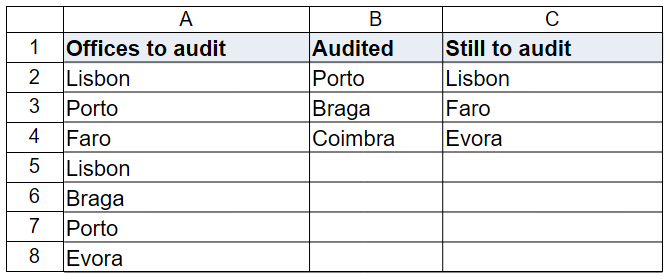
A small example: two lists, the formula our tool produced for them and the result of computing it. The data is invented for the example.
Formula for Excel
=FILTER($A$2:$A$8,($A$2:$A$8<>"")*(ISNA(MATCH($A$2:$A$8,$B$2:$B$4,0)))*IFERROR(MATCH($A$2:$A$8,$A$2:$A$8,0)=ROW($A$2:$A$8)-ROW($A$2)+1,FALSE),"")The formula was verified by computing it on this example (7 rows in the first list, 3 in the second): the result equals the reference answer. The example was also recomputed in LibreOffice Calc with the same result.
FILTER keeps only the values of $A$2:$A$8 that are not in $B$2:$B$4 and returns them as a list. Paste into C2 and press Enter — the list spills down by itself (Excel 365, Google Sheets). The cells below must be empty.
Other verified variants
- INDEX/SMALL (array)
=IFERROR(INDEX($A$2:$A$8,SMALL(IF($A$2:$A$8="","",IF(ISNA(MATCH($A$2:$A$8,$B$2:$B$4,0)),IF(MATCH($A$2:$A$8,$A$2:$A$8,0)=ROW($A$2:$A$8)-ROW($A$2)+1,ROW($A$2:$A$8)-ROW($A$2)+1))),ROWS($A$2:A2))),"")
Values of the first list that are not in the second (3)
Lisbon, Faro, Evora
Compare your own lists
The tool below is already set up for this task. Paste your columns to get a formula for your version and the list, both checked by computing. 3 free comparisons a day, no sign-up.
Formula
Where to paste
Values of A that are not in B:
Please note
How it works
Other formula variants
Free comparisons for today are used up (3 a day)
Your results above stay. Free comparisons come back tomorrow.
Pro for $7/month — coming soon
Pro is coming — leave nothing, we just count interest.
The example
The audit plan names seven offices, but Lisbon and Porto were entered twice by two different managers. Porto and Braga have been audited, and Coimbra was audited although it was not in the plan. The result lists Lisbon, Faro and Evora — once each, in the order of the plan.
How the de-duplication works
For every row the formula checks two things: the value is not found in the second list, and this row is the first row where the value occurs in the first list. The second check compares the position that MATCH finds for the value inside its own list with the current row number. Only the first occurrence passes, so repeats disappear from the result without changing the source data.
Which formula your Excel needs
- Excel 2021 and Microsoft 365 — use the example's main formula with FILTER; type it once and the list spills down.
- Excel 2010–2019 — use the INDEX/SMALL array formula listed under the example, confirm it with Ctrl+Shift+Enter and copy it down.
- Google Sheets — pick it in the tool; it returns FILTER wrapped in IFERROR, because Sheets has no if-empty argument.
- Not sure which version you have — File → Account → About Excel shows it.
Tidy the lists first
A comparison is only as good as the spelling. Before running it, sort each list and scan for near-twins such as "Evora" and "Évora", or "St. Paul" and "Saint Paul". The formula treats them as different entries, and no setting can guess that they mean the same place.
Common mistakes
Accents and special letters
É and E are different characters for every Excel function. Decide on one spelling and replace the other with Find and Replace before comparing.
Blank rows in the plan
Blank cells in the first list are skipped and never listed as missing. If a blank row means "to be decided", fill it with a placeholder text so that it shows up.
The second list grows later
If you extend the audited list below the range used in the formula, the new rows are ignored. Turn both lists into Excel tables or use a range with spare rows.
Questions and answers
Can I keep the repeats?
Yes, untick "Without duplicates" in the tool and every row of the first list that is missing is returned.
Does upper or lower case matter?
Not by default — "porto" and "Porto" count as the same entry. Tick "Match case" when it should matter.
Is my data uploaded anywhere?
It is sent to our server for the calculation and processed in memory only; it is not saved.